Channel List
The Channel List provides a customisable list of available channels. This is useful to group similar channels or those which are used together. The Channel List works in the same way as the Option Selection List, just for channels not options. For how to add objects see the Adding an Object section.
When the ECU is offline, the values in the Channel List are greyed out.
Adding Channels
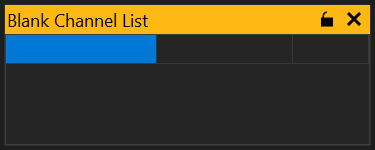
When a Channel List is added you be shown a blank list with a single blank entry:
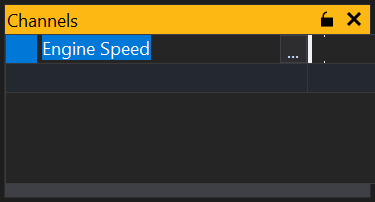
To add an channel simply start typing the name of the channel and GWv4 will provide a list of likely options or click the ‘…’ button and you will be shown a list of all available channels. Select the channel you want to display and click ‘OK’. This will add the selected channel to the list and provide a new blank entry from which to select another channel:
Adding Multiple Channels
From the channel selection list you can add multiple channels. Click on the ‘…’ button to bring up the available channels, then either click and drag over the channels, or use mouse click and either Shift or Ctrl keys to select separate items.
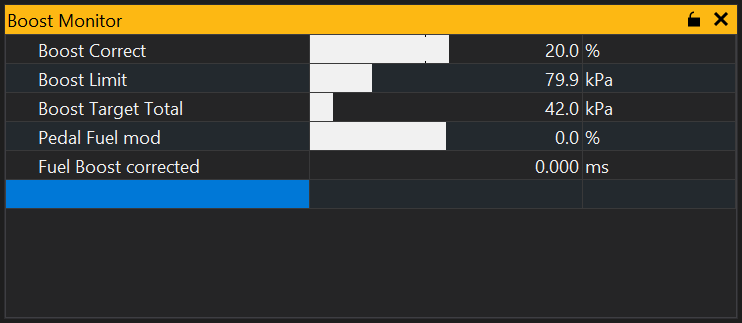
Once selected, click ‘OK’ and the items will be added to your selection list:
Setting up Limits
For each channel displayed you can set up limits. This can either be to set the range of values (view range) displayed by the bar or to set warnings if the value goes above or below certain values (alarm range). Right click on the channel in the list you want to set a limit for and click on limits, alternatively simply use the keyboard shortcut Alt+L and the following window will be displayed:
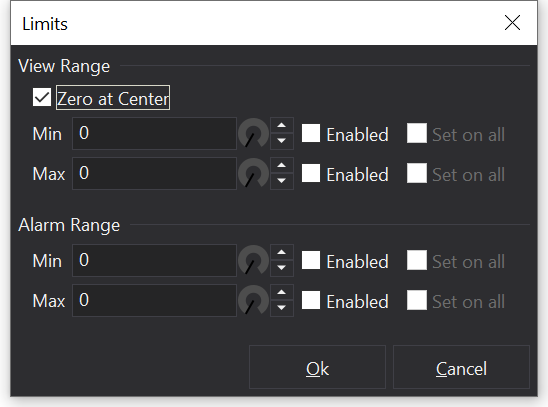
The view range, and alarm range can then be set for the channel. If set then they will automatically be enabled, though they can be disabled again by simply un-ticking the enable box.
If the channel then goes out of the alarm range, the channel will go red, as can be seen in the Bar section.
Locking the list
The list can be locked by clicking on the padlock icon  in its title bar. This prevents items being added or removed from the list.
View Properties
Properties editable via the properties editor.
| Property | Script ID | Description |
|---|---|---|
| Title | title |
The title of the window. |
| Script ID | id |
The scripting ID of the window. Can be used as an alternative to the title for searching for windows from scripts. |
| Tool Tip | tooltip |
Window tool tip. |
| Font Size | font_size2 |
Size of the text used in the list. |
| Minimum Font Size | min_font_size |
Minimum size of the text used in the grid with auto font size. |
| Maximum Font Size | max_font_size |
Maximum size of the text used in the grid with auto font size. |
| Auto Font Size | auto_font_size |
Automatically determine the font size based on the size of the grid. |
| Alpha Sort | sort_mode |
Sort items in the grid alphabetically. |
| Condensed | condensed |
Condenses items into groups based upon the first word in the name. |
| Expandable Min/Max | expandable_minmax |
Sets whether this view can display minimums/maximums in a tree based format. |
| Min/Max Ticks | minmax_ticks |
Sets whether this view displays min/max value telltales. |
| Value Bars | value_bars |
Sets whether this view displays bars indicating values in the value column. |
| Name | show_col_name |
Sets whether this view should display the 'name' column. |
| Identifier | show_col_ident |
Sets whether this view should display the 'identifier' column. |
| Display Identifier | show_col_display_ident |
Sets whether this view should display the 'display identifier' column. |
| Long Identifier | show_col_long_ident |
Sets whether this view should display the 'long identifier' column. |
| Description | show_col_desc |
Sets whether this view should display the 'description' column. |
| Selected | selected |
Selected sites. |
| Freezable | freezable |
Sets whether this view is frozen when 'Freeze Mode' is enabled. |
| Channel | |
The currently selected channel. |
| Update Rate | |
Rate at which the selected channel(s) update. |
| Limits | |
Set up limits for the selected channel(s). |
| Decimal Places | |
Number of decimal places to display. |