Table Grid
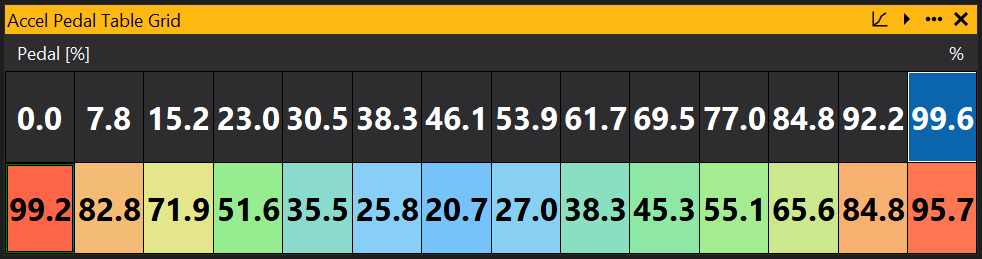
The table grid is a grid representation of the values in a table. It can be used to view and edit these table values. For how to add objects see the Adding an Object section.
Selecting and Editing the Table Grid
To select a single site, click on the grid value. To select a range of sites, click and drag the mouse or hold down Shift and use the left and right arrow keys.

To edit, use [ and ] (or +/-) keys to increment/decrement the selected sites, or type a number in to set a specific value.
When the ECU is online, press the Space bar to select the site nearest to the current cursor site.
Configuring the Axis
For some tables the axis can be configured. This is when the axis is based on another table or on an option. To edit a point on the axis, simply double click on the point on the axis and type in the new value.
View Properties
Properties editable via the properties editor.
| Property | Script ID | Description |
|---|---|---|
| Object | object |
Name of the object displayed by this view. |
| Title | title |
The title of the window. |
| Script ID | id |
The scripting ID of the window. Can be used as an alternative to the title for searching for windows from scripts. |
| Tool Tip | tooltip |
Window tool tip. |
| Font Size | font_size |
Size of the text used in the grid. |
| Minimum Font Size | min_font_size |
Minimum size of the text used in the grid with auto font size. |
| Auto Font Size | auto_font_size |
Automatically determine the font size based on the size of the grid. |
| Text Align | text_align |
Automatically determine the font size based on the size of the grid. |
| Stretch Axes | stretch_axes |
Automatically determine the font size based on the size of the grid. |
| Min Cell Width | min_cell_w |
Cell size control. |
| Min Cell Height | min_cell_h |
Cell size control. |
| Max Cell Width | max_cell_w |
Cell size control. |
| Max Cell Height | max_cell_h |
Cell size control. |
| Colour Mode | colour_mode |
Control how colours are displayed for this object. |
| Auto Text Contrast | auto_text_contrast |
Picks an appropriate text colour based upon the background colour automatically. |
| Position Box | position_box |
Box displaying the current site location when online. |
| Show Trails | motion_trails |
Display trails of where the site position has been over time when online. |
| Trail Time [s] | motion_trail_time |
Time that motion trails display for when online, in seconds. |
| Trails Infinite Time | motion_trail_infinite |
Motion trails set to infinite time. |
| Link Selection | link_selection |
Links the selection with views of the same object (e.g. links the selection on map grid and graph views). |
| Selected | selected |
Selected sites. |
| Soft Selection Range | range |
Sets the 'soft' range of partially selected points. |
| Follow ECU Mode | follow_mode |
Follows the current site with the selection. |
| Small Increment | increment_small |
Sets the small increment / decrement value for keyboard control with '[' and ']' keys. |
| Large Increment | increment_large |
Sets the large increment / decrement value for keyboard control with Shift-'[' and Shift-']' keys. |
| Is Scaled Increment | increment_real |
If set to 'Yes', uses the small/large increment to increment the scaled (real) value rather than the raw integer value. |
| Decimal Places | decimal_places |
Overrides automatic decimal places. |
| Swap X and Y | swap_xy |
Swaps X and Y axes. |
| Invert X | invert_x |
Inverts the X axis. |
| Invert Y | invert_y |
Inverts the Y axis. |
| Fill Gradient | gradient_fill |
Gradient used for the fill depending upon value |
| Axis Gradient | gradient_axis |
Gradient used for the axis fill depending upon value |
| Overlay | overlay |
Selects an object to overlay colour on the grid. |
| Range Mode | range_mode |
Changes the axis scale limits: Preferred: Equivalent to 'Auto'. None: Uses the full range. Auto: Scales to fit. Fixed: The default value, fixed at the range defined in the GIN file, or the full range if not defined. User: User defined minimum and maximum. |
| Minimum | range_min |
Minimum for user defined range. Range Mode must be set to "User". |
| Maximum | range_max |
Maximum for user defined range. Range Mode must be set to "User". |