Calibration Aspects
Calibration Aspects are a way of loading/saving only a portion of a calibration file.
Aspects can be used to store specific aspects of an ECU setup.
For example you might want to save a number of different aspect files that only have the Lambda table and the Lambda In X2 options in them. The resulting files can then be used to quickly reconfigure the ECU based upon a change of lambda sensor.
This is open-ended and can be used to load or save any combination of options, tables and maps.
Aspects can be created from the current calibration by selecting
To open a calibration aspect, select
Save Calibration Aspect
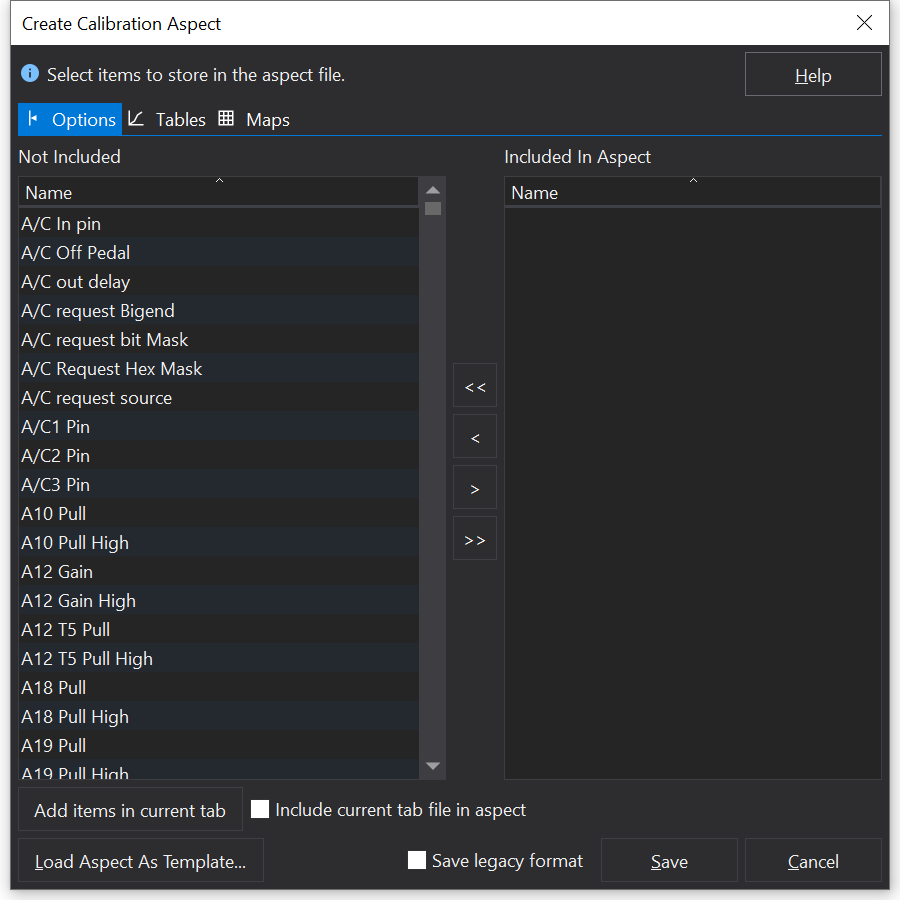
Select items that you wish to store in your aspect file in the left hand list and move them to the right hand list.
You can do this using a number of methods:
- Double click on an item.
- Select items and then drag them across.
- Select items and click on the single arrow button.
All items can be moved across using the double arrow button.
To switch between tables, options or maps, click on the appropriate tab at the top of the window.
Once you have selected the items that you want in your aspect file, click on the ‘Save’ button and select a filename for the aspect file.
Choose GEMS .aspectx, legacy native, or ASAM CDF 2.1 format. GEMS .aspectx remains the default.
CDF import and export support enumerated items, Boolean options and ECU strings as well as numeric values.
Modified This Session
Use Add Items > Modified This Session to select objects whose current values differ from the original calibration data loaded into this session. This is different from the saved Changed calibration state.
The selection represents net differences, not an edit history: changing a value and restoring it removes that difference. Saving does not start a new comparison baseline. A selected table or map is saved in full, even if only one cell changed.
Regionless XCP Characteristics
Characteristics outside calibration regions can be saved in Calibration Aspect or ASAM CDF files, including supported ECU strings and required axis data. They do not need a MEMORY_SEGMENT in the A2L file.
Add Items also offers Viewed This Session and Fetched Values selections for A2L definitions. Modified This Session includes user edits, but fetching (or polling) alone does not count as a modification. Measurements are excluded, including measurement arrays represented as tables or maps.
Only complete values can be exported; an unread value is not replaced with zero. Cached/stale values remain exportable as the saved snapshot. Fetch values first if a fresh ECU snapshot is required.
Use the XML-based Calibration Aspect or CDF format for these values. The legacy binary calibration aspect format cannot represent regionless characteristic snapshots and will result in an error.
Exporting or saving an aspect does not change the default Send Calibration programming behaviour of only sending data within calibration MEMORY_SEGMENTs.
Load Aspect As Template
You can use a previously created aspect file as a template for generating a new aspect file. This will select all of the same items that were selected in the original file but will use the values that are in the current calibration.
CDF files can also be used as selection templates. Symbols must match the current ECU definition; template values are not imported.
Load Calibration Aspect
This will load the values in a calibration aspect into the current calibration.
Once you have selected the aspect file, you will be offered the opportunity to review the items that will be changed:
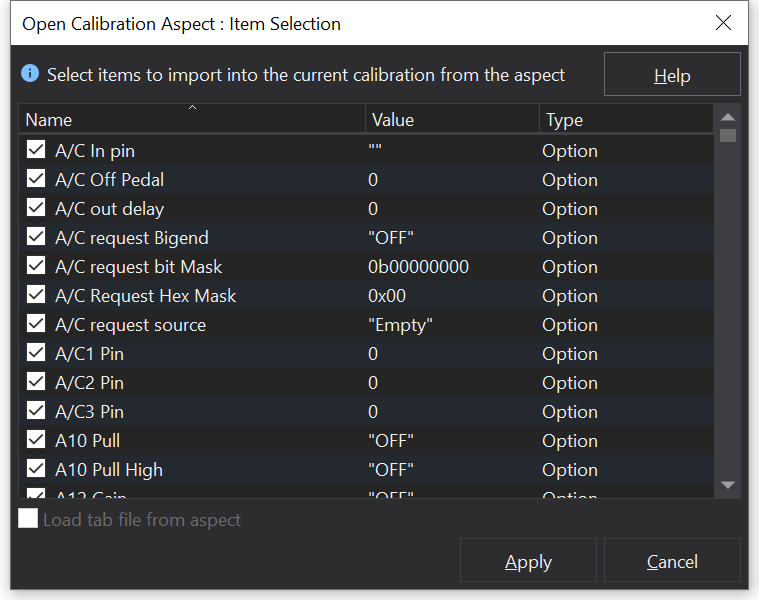
If you do not want some of the values to be loaded in, then simply un-tick the items you do not want included
Usually this is unnecessary and you’ll just need to click ‘Apply’.
ASAM CDF 2.1 Interchange
CDF (.cdfx) is an alternative aspect format for exchanging scalar values, curves, two-dimensional maps and ECU strings, including enumerated and Boolean values. It can contain a few selected parameters or a larger dataset. Parameters absent from the file are left unchanged.
Open the matching calibration and ECU definition (GIN or A2L-derived definition) first, then use Open Calibration Aspect. CDF is not a standalone ECU memory image and does not supply addresses, raw storage types or scaling definitions.
CDF symbols match identifiers exactly and case-sensitively. Where no identifier is available, the exact native name is used. Unknown or ambiguous symbols, incompatible units, unsupported data, read-only targets and out-of-range values are reported. Deselect invalid records before applying. Empty units are not assumed to match dimensional values. Successful imports do not display a confirmation popup; errors and warnings are still reported.
The value preview uses the destination’s display precision where units match; the imported data retains its full precision. Source and destination cells show only units and array sizes, for example ms [24, 17]. Unitless scalars are shown as -.
Axes and Interpolation
By default, curve/map dimensions and physical breakpoints must match the destination. Equal numbers of cells alone do not guarantee compatibility.
Enable Interpolate onto existing axes to resample numeric curves linearly and maps bilinearly in physical coordinates. Destination dimensions and breakpoints are preserved. Axis values and units must be available and compatible; source axes must be strictly increasing or decreasing. Duplicate/non-monotonic axes, discrete data and destination points outside the source domain are rejected. There is no extrapolation, edge clamping or automatic resizing.
CDF axis records provide matching/interpolation context, not implicit breakpoint edits. Resolvable shared axes are supported; unresolved external references and rescale axes are not. Explicitly selected axis tables, selectors and scaling parameters are imported before the values that depend on them, regardless of file order. The complete selection is validated against its resulting axes and scaling before the destination is changed. Changing the selection refreshes validation; invalid or cyclic dependencies prevent import. All selected changes form one undoable edit.
Export Scope
CDF export includes complete selected objects and their physical axes, so another tool can interpret them without GCS layout data. Modified This Session can be used for this selection, but CDF is not inherently a session log or arithmetic delta.
Enumerations use textual CDF values with exact, case-sensitive label matching. Export also includes coded values to preserve raw selections where labels are duplicated. Import accepts a coded enumeration value only when it is representable by the destination and maps to the supplied label; ambiguous labels without coded values are rejected. Boolean values use the CDF BOOLEAN category with true/false text; import also accepts numeric 0/1. Enumerated and Boolean curve/map values require matching axes and cannot be interpolated.
ECU strings use the CDF ASCII category with whitespace-preserving textual values. UTF-8 and UTF-16 destination storage are supported. Overlength strings are rejected rather than truncated; shorter values are space-padded to the fixed ECU string length. String edits participate in the same grouped undo and failed-import rollback as numeric edits.
GCS tabs/layouts are not included. This implementation supports CDF 2.1 namespaced and DTD-style input, but not variant-coded or multiple-tree datasets, general value blocks, structures, blobs, higher-dimensional objects or quality-history round-tripping. Unsupported selected objects prevent export rather than being silently omitted.