Timers Tab
Overview
The Timers Tab provides configuration of various types of timers.
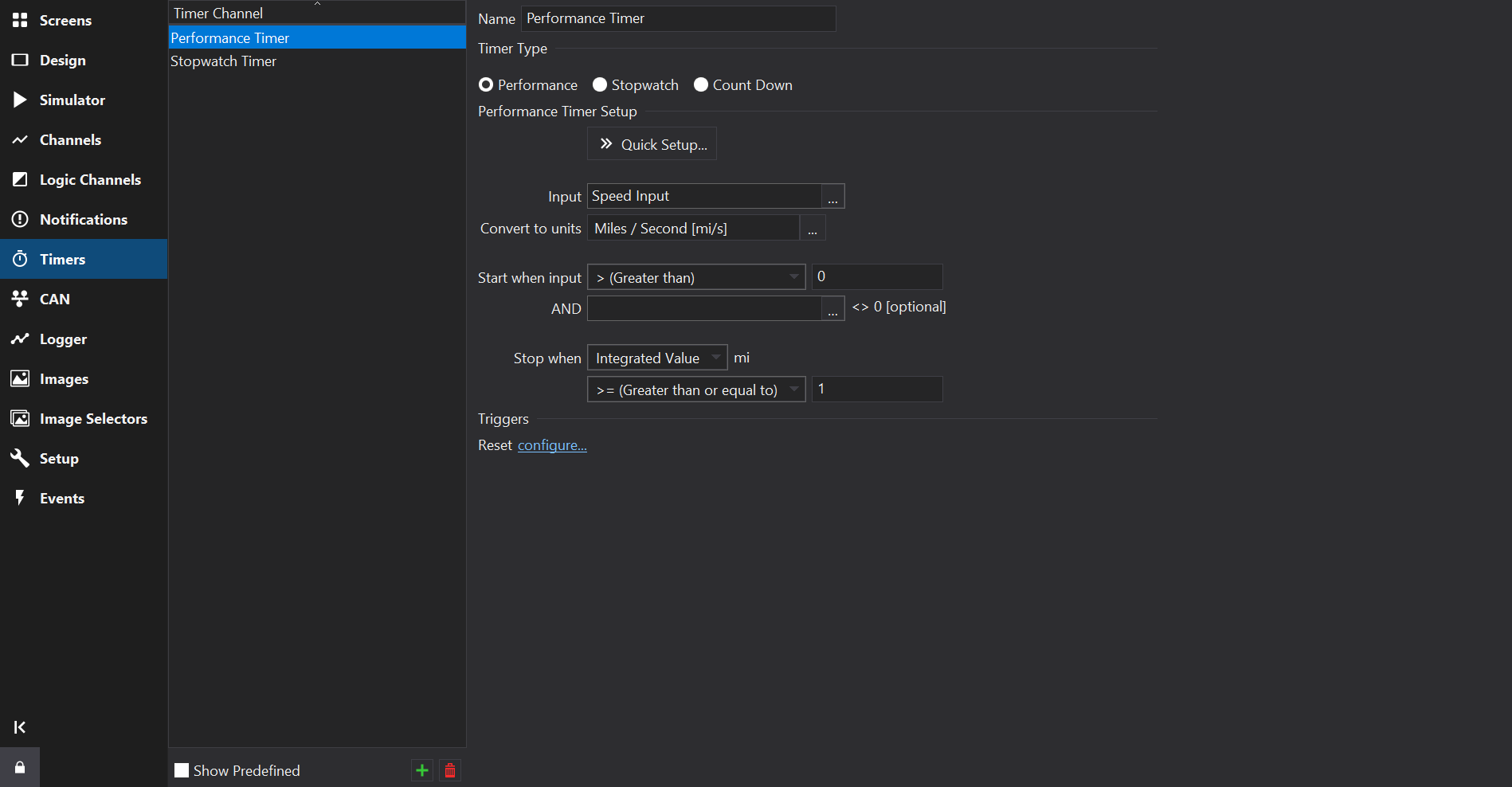
Timer Types
Performance Timer
Performance Timers provide a convenient way to configure timers that measure the time elapsed over a range, typically distances or speeds. For example, time over 1km or 0…60mph or 60…100mph etc.
Use the  Quick Setup… button to easily configure a Distance Timer… (e.g. time over 1km) or a Speed Range Timer… (e.g. 0…60mph).
Performance Timer Setup
| Setting | Description |
|---|---|
| Input | The input channel, typically a speed channel. |
| Convert to units | The units that the input is converted to before it is used, e.g. a speed unit for the input. |
| Start when input … | The condition on the input that starts the timer, e.g. when the speed rises above zero. |
| AND … <> 0 [optional] | An optional channel that must also be non-zero for the timer to start. |
| Stop when … | The condition that stops the timer. The value tested may be the Input Value, the Integrated Value (e.g. distance from a speed input), the Summed Value or the Value Offset. |
The Quick Setup options configure these settings: a distance timer integrates the speed input and stops at the given distance; a speed range timer starts and stops at the given speeds.
Distance based Performance Timers will typically use a speed input and numerically integrate the speed to give distance for the stop condition limit. Integration is performed with respect to time, so the speed should be converted to units of d/s, where d is a distance unit (e.g. km/s or mi/s) - integration will then result in a value with units d. The Distance Timer quick setup sets Convert to units from the speed units chosen in the quick setup dialog.
Integration uses the trapezoidal rule and the stop time is interpolated between the samples between which the stop condition became true.
Performance Timer Events
| Event | Description |
|---|---|
| Reset | Resets the performance timer to 0, any integrated values will also be reset to 0. |
Stopwatch
A timer that may be started / stopped / reset by the event system. Stopwatch timers are reset to 0 and count up from there.
Stopwatch Events
| Event | Description |
|---|---|
| Start | Starts the stopwatch timer. The timer shall continue counting from its current internal value. |
| Stop | Stops the stopwatch timer. The value is held until the timer is started again or reset. |
| Reset | Stops the stopwatch and resets it to 0. |
| Stop Until Reset | Stops the stopwatch. If this event is received then the stopwatch must receive a Reset event before it may be restarted. |
| Toggle | Starts the timer if currently stopped, otherwise stops the timer. Can be useful for manual start/stop buttons. |
Count Down
Count Down timers start at an editable starting time, Initial Value (hours, minutes, seconds and milliseconds), and count down from there until 0 is reached. The timer then stays at 0; it does not go negative.
As with Stopwatch timers, Count Down timers are controlled by the events system.
The remaining time may be adjusted by increase / decrease events. This can be useful for implementing a count down timer configuration page on the display. If hardware buttons are available then when on the timer configuration page, the buttons can be routed to the timer using the events system. See also Events Tab . Adjustments do not change the Initial Value, so they are lost when the timer is next reset.
Count Down Timer Events
| Event | Description |
|---|---|
| Start | Starts the count down timer. The timer shall continue counting from its current internal value. |
| Stop | Stops the count down timer. The value is held until the timer is started again or reset. |
| Reset | Stops the count down timer and resets it to the Initial Value. |
| Toggle | Starts the timer if currently stopped, otherwise stops the timer. Can be useful for manual start/stop buttons. |
| Increase | Adds Adjust Delta [s] to the remaining time. If the timer is running at 0, it continues counting down. |
| Decrease | Subtracts Adjust Delta [s] from the remaining time, down to a minimum of 0. |
Triggers
The Triggers section selects the events that control the selected timer (e.g. Start, Stop, Reset, Stop until reset, Toggle, Increase and Decrease, depending upon the timer type). These events are also shown on the Events Tab .